Redeem birthday rewardsUpdated 3 days ago
As a Love Your Body™ Club member, you’ll receive a special treat from us on your birthday. Here’s how it works:
Receiving Your Birthday Reward
On the day of your birthday, your reward will be appear in your account. Simply log in and view your rewards. An email containing your unique birthday reward code will be sent up to 48 hours after your birthday.
Shopping online: Add this code in the discount code box at the checkout.
Shopping in-store: Please log in to your account and present this code at the checkout or show them your email.
Didn’t Receive Your Email?
Sometimes emails can end up in your spam or promotions folder, so it’s worth checking there first.
If you still can’t find the email, don’t worry as you can access your reward directly in your Love Your Body™ Club account.
Finding Your Birthday Reward in Your Account
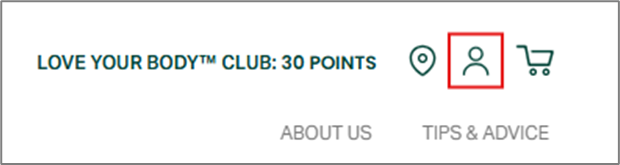
- Log in to your customer account: Select the Customer Account icon in the top right-hand corner of our website and enter the email address registered to your account.
- Enter your 6-digit login code
A 6-digit code will be sent to your registered email address. Enter this code to sign in to your account.
View your Active Rewards
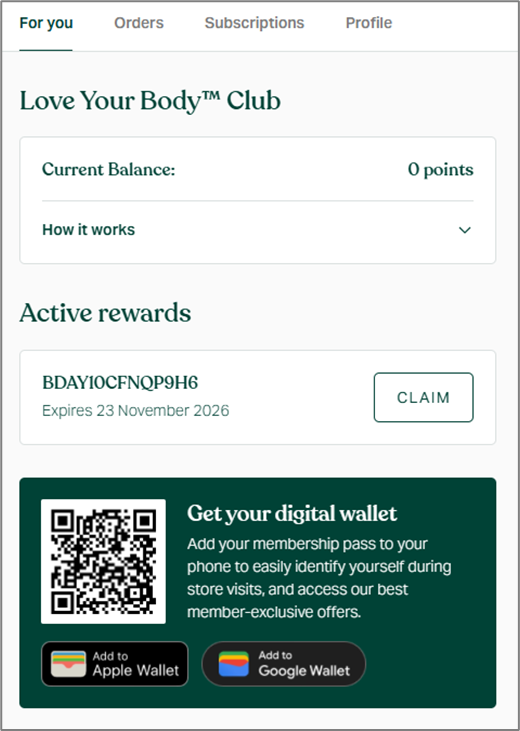
Once signed in, the Customer Accounts drawer will open on the left-hand side of the screen. Here, you’ll see any Active Rewards currently available on your account.
Locate your Birthday Reward
If you have an active Birthday Reward, you’ll see a unique reward code displayed. It will look similar to: BDAY0123245678
Claim your Birthday Reward
Select Claim on the Birthday Reward. You can then either:
Select Copy Code to copy the reward code, or
Select Apply to Cart to apply the reward directly to your shopping cart.